Invited by a building operator
Operators using Harmelo can invite your company to document work on their properties. Access is granted by building.
Unit history before you arrive. Readings, photos and notes filed against the right equipment. Proof of work your customer can see, credited to your company.
See the history and information already connected to the equipment.
Keep observations, photographs, readings and recommendations together.
Give the next technician and customer a record they can actually use.
Before the truck stops
When a building operator invites your company and grants access to its buildings, your team can review the relevant equipment history before attending the site, even if another contractor did the earlier work.
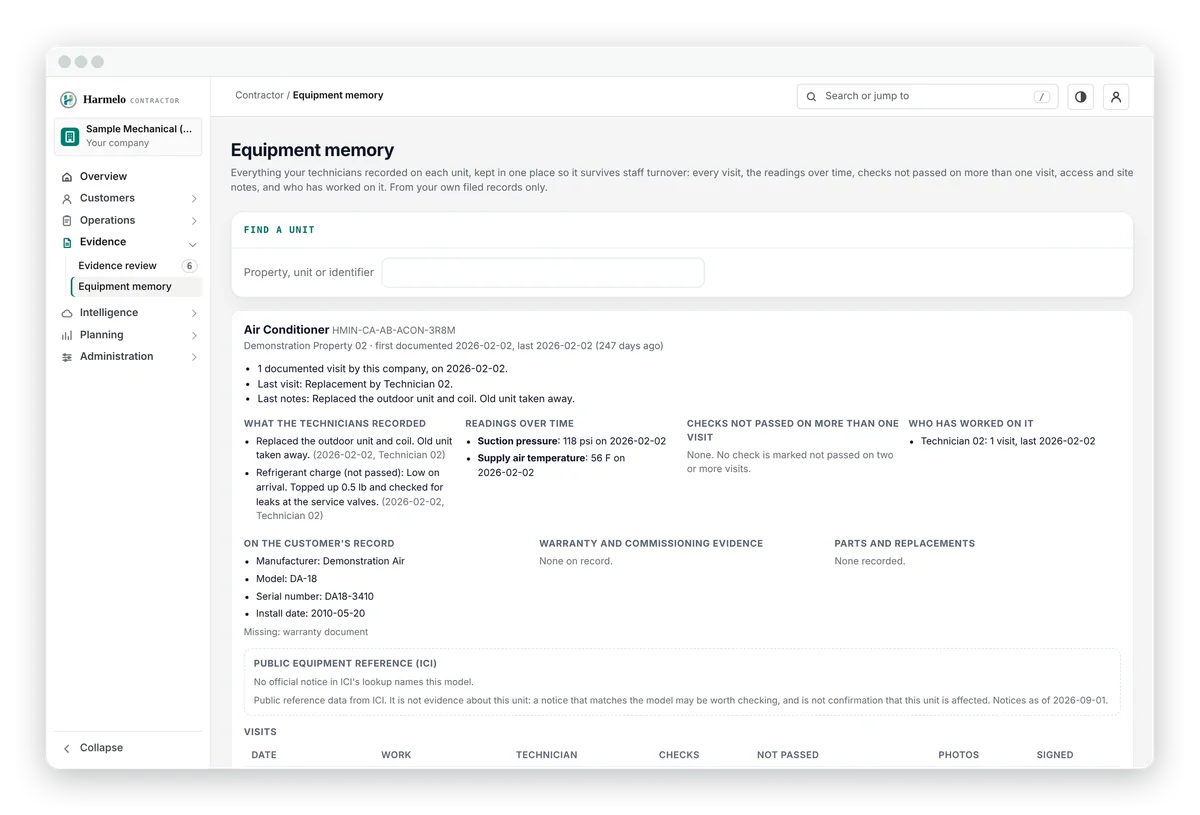
Equipment memory shows its history across every technician who has serviced it.
The practical advantage

Before the visit, in the field, after the visit
Technicians file from their phones, against the specific unit.
Before the visit
Arrive with context
In the field
Document the work
After the visit
Make the next visit smarter
Seasonal preparation
Use past local conditions and your own records to schedule routine work before the rush.
The Building Almanac is a free public resource from the Infrastructure Condition Index, a separate Harmelo product. Harmelo does not predict failures, guarantee demand or replace your dispatch software.
Why contractors use it
Not extra paperwork: the work your crew already does, made useful to your customers, your office and your next technician.
A technician arriving for the first time can begin with the same recorded history and job context available to your most experienced staff.
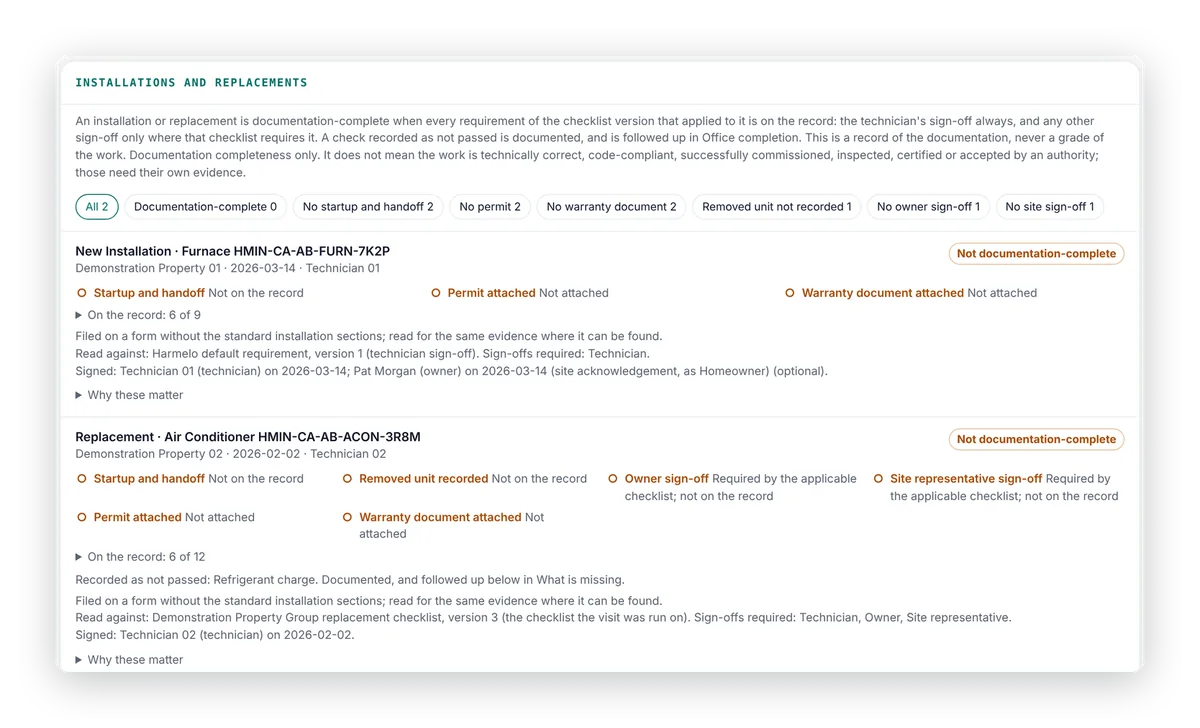
The customer summary comes from the signed record: what was done, found and recommended.
Residential and commercial
Houses, condominiums and small multi-unit buildings, where your reputation depends on knowing the house.
When the home is sold, the record can transfer to the new owner, with your work still attributed to you.
Portfolios, plants and public buildings, with client reporting you can stand behind.
Harmelo runs alongside your CRM, dispatch and CMMS. It does not replace how you schedule, quote or invoice.
What it never exposes. Owners see the service history of their own equipment. It does not expose your pricing, your margins, your internal notes or your employee information beyond the name of the technician who signed the record.
How contractors take part
Harmelo links the companies that make and supply equipment, the contractors and technicians who install and service it, and the operators and owners responsible for it.
Operators using Harmelo can invite your company to document work on their properties. Access is granted by building.
We are developing supplier-sponsored programmes with a small number of equipment suppliers. None is in place yet, and terms are agreed per programme.
Your information stays yours. Suppliers do not automatically receive customer records, property addresses, serial numbers, your pricing or confidential service details. Any wider insights would come later, only from data its owners have authorized for that use.
Request a contractor walkthrough Explore supplier partnerships
Pricing
Contractor access is arranged with Harmelo after review. We prepare a proposal based on the size of your team, the work you file and the organizations you serve.
Tell us about your company and we will walk you through how technicians file work against the equipment record.
How we deal with you
Harmelo preserves what your company documents without ranking contractors, selling placement or taking ownership of your commercial information. The same record terms apply to every contractor on Harmelo.
You are never ranked or scored. There is no blacklist, and no preferred placement to buy. Operators see the signed records each company files.
A record shows which identified account filed the work. We do not certify you or your work; the workmanship stays between you and your customer.
We do not promise you leads, work or customer retention. Your pricing, notes and commercial information remain yours. Participation does not give Harmelo ownership of your underlying information.
We will walk you through the contractor console and field app with demonstration data.
Next step
Tell us about your company. Someone from Harmelo will reply to arrange a virtual walkthrough of the contractor console and field records, using demonstration data.